In this article
You already have the content for your ebook. It is sitting in an old blog post, a podcast episode, or a PDF nobody has opened in a year. Designrr’s whole pitch is that it can turn that content into a formatted lead magnet in minutes, no writing from scratch, no design skills required. This review covers what Designrr actually does, what each plan costs, where it falls short, and whether it beats building your lead magnet in Canva instead.

What Is Designrr and How Does It Work?
Designrr (designrr.io) is ebook and lead-magnet creation software that converts existing content, blog posts, PDFs, Word docs, or audio and video files, into a formatted ebook, PDF, or flipbook. Designrr states on its own site that it has more than 320,000 customers and has run since 2016.
The workflow has five steps, per Designrr’s own site: choose a source, review the auto-generated draft, pick a template, tweak the design, and publish. Import a blog URL and Designrr pulls the text automatically. Upload an audio or video file, including a YouTube link, and it transcribes the spoken content into editable text first. You edit the draft in a writer-focused editor, not a raw transcript, then apply a template and export.
That import range is the actual differentiator. Most lead magnet tools, Canva included, assume you are starting from a blank page. Designrr assumes you already have the content somewhere and just need it repackaged. For a blogger like Jordan, who has two years of articles and no content-specific lead magnets, that changes the math: this is not another three-week ebook project, it is an afternoon of repurposing.
It does not replace strategy. If your lead magnet should be a checklist or a quiz instead of an ebook, Designrr is the wrong tool regardless of how fast it works. See our lead magnet tools comparison if you have not settled on a format yet.
What Features Does Designrr Include?
Importing and Repurposing Existing Content
Designrr imports content directly from a blog URL, Word document, Google Doc, PDF, or audio and video file, including YouTube links, and automatically transcribes spoken content into editable text. Designrr’s own FAQ claims no other ebook tool matches this range of import sources, a vendor claim we have not independently verified against every competitor.
You do not need WordPress. Designrr pulls content from Squarespace, Shopify, HubSpot, and most other blog platforms using the post URL alone, per its own site. That matters if your content lives outside a typical CMS. For podcasters and video creators specifically, the auto-transcription means a 40-minute episode becomes a rough written draft without you typing a word.
Wordgenie: The Built-In AI Writer
Wordgenie is Designrr’s AI content engine, released in early 2023 per Designrr’s site, that drafts ebook or lead-magnet content directly inside the editor when you do not have a source to import. It ships on the Standard plan, with a more advanced “Wordgenie PRO” version starting on the Pro tier, per Designrr’s pricing page.

Wordgenie exists for the opposite case from importing: you have a topic but no existing blog post or recording to pull from. You give it a prompt, it drafts a first pass, and you edit from there. Treat it the way you would treat any AI first draft, a starting point that still needs your voice and your specifics, not a finished lead magnet.
Templates, Covers, and Design Customization
Designrr’s template library ranges from 100 project templates on the Standard plan to 300+ on Pro and above, with 200+ cover designs and 922 Google Fonts available from Pro up, per Designrr’s pricing page.
The design layer is where Designrr earns the “no designer needed” claim. You are not building a layout from scratch, you are swapping content into an existing template and adjusting fonts, colors, and the cover. The Pro tier and above add a 3D cover image tool, which renders your flat cover as a tilted, realistic-looking book mockup, a common trust signal on lead magnet landing pages.
Export Formats and the Flipbook Generator
Designrr exports finished projects as PDF, Kindle-ready Mobi, ePub for iBooks, and embeddable HTML, plus a flipbook generator that turns any uploaded PDF into an interactive page-turning book, available from the Pro plan up, per Designrr’s pricing page.
For a lead magnet specifically, PDF export is what most creators need. The Kindle and iBooks export matters more if you plan to also sell the finished ebook, which several personas on MagnetKit.my eventually do once the lead magnet proves itself. The flipbook format is a nice-to-have for landing pages that want an interactive preview before the download.
What Are Designrr’s Pros and Cons?
What Designrr Does Well
- Genuinely fast repurposing. Importing a blog post or transcribing a podcast into a rough draft in minutes is the real time saver, not a marketing exaggeration.
- Wordgenie covers the blank-page case too. You are not stuck if you have no existing content to import.
- Wide export coverage. PDF, Kindle, ePub, and HTML embed in one tool means you are not exporting from one app and reformatting in another.
- Large template and font library. 300+ templates and 922 fonts on the higher tiers reduce the design decisions you have to make.
- Well-regarded for ease of use. Trustpilot’s review summary for designrr.io, covering 379 ratings, describes reviewers as overwhelmingly positive, with software simplicity mentioned frequently.
Where Designrr Falls Short
- No confirmed free plan. Designrr’s pricing page lists four paid tiers starting at $29 a month; unlike some competitors, there is no permanent free tier to test the product risk-free.
- Mixed reception outside the review sites. A thread on r/WritingWithAI titled “Do not use/pay for Designrr App” shows at least one user warning against it, though a reply in the same thread describes an intuitive experience with no login or licensing issues. Read a few real threads yourself before buying.
- An ebook is not always the right format. A repurposed 40-page ebook can still underperform a one-page checklist for opt-in rate. Designrr is a production tool, not a substitute for picking the right format first.
- Transcription hours are capped. Even on paid tiers, audio and video transcription is limited to 4 hours a month on Premium and 8 on Business, per Designrr’s pricing page. Heavy podcasters may hit that ceiling.
Designrr Pricing: What Do the Plans Actually Cost?
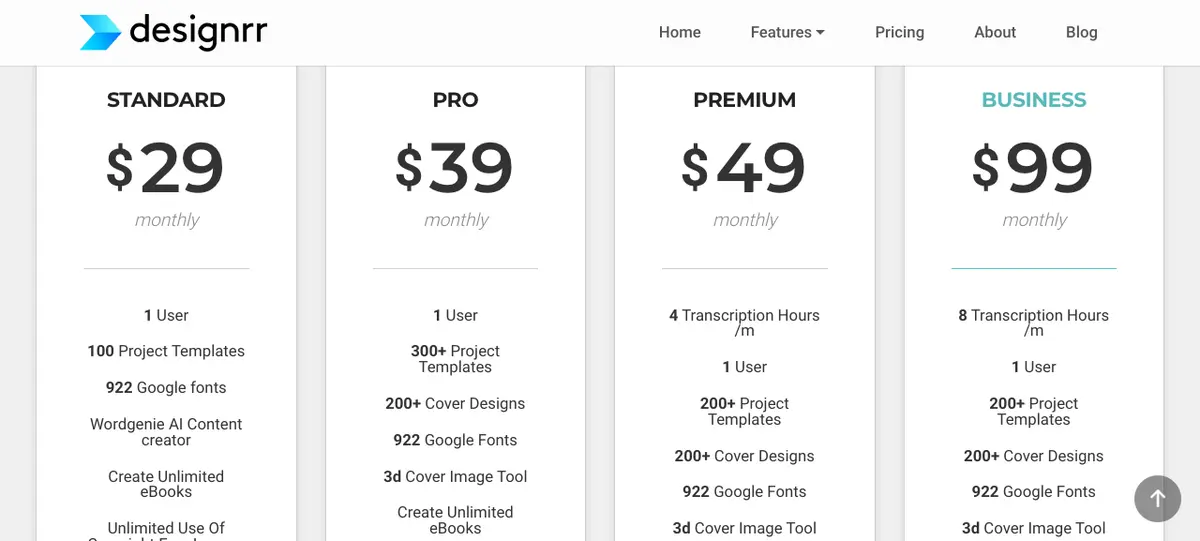
| Plan | Price (Monthly) | Templates | Cover Designs | Transcription Hours/mo | Best For |
|---|---|---|---|---|---|
| Standard | $29/mo | 100 | Not included | None | A first ebook lead magnet from existing text content |
| Pro | $39/mo | 300+ | 200+ | None | Flipbooks, Kindle/ePub export, and the 3D cover tool |
| Premium | $49/mo | 200+ | 200+ | 4 hrs | Podcasters or video creators repurposing audio regularly |
| Business | $99/mo | 200+ | 200+ | 8 hrs | Teams publishing several lead magnets a month |
Pricing and plan limits per Designrr’s pricing page, captured September 2026. Designrr also runs recurring “lifetime access, no monthly payments” promotions with a countdown timer on the same page. Treat the urgency messaging as a sales tactic, and compare the total lifetime price against 12 or more months of the Standard plan before deciding it is the better deal.
Is Designrr Worth It? Who Should Use It
Use Designrr if:
- You already have blog posts, a podcast, or video content and want to repurpose it into an ebook or PDF lead magnet fast
- You want one tool covering ebook creation, PDF export, Kindle publishing, and flipbooks
- You are fine paying at least $29 a month with no confirmed free tier to test first
Skip Designrr if:
- You have no existing content and want to build a lead magnet from scratch on a $0 budget. Start with our Canva lead magnet walkthrough instead
- Your audience converts better on a checklist or quiz than a document format. See our quiz builder review or the full lead magnet tools comparison
- You want to test the tool for free before committing to a monthly plan

For Jordan, the blogger with two years of unrepurposed content and a single generic lead magnet, Designrr solves a real problem: turning existing articles into topic-specific ebooks without a redesign project. For Maya, starting from zero with no blog archive to import from, the $29-a-month price tag buys less value on day one. She would get more out of a free Canva checklist first, then revisit Designrr once she has content worth repurposing.
Frequently Asked Questions
Is Designrr free to use?
Designrr’s pricing page does not list a permanent free plan. The four paid tiers start at $29 a month for Standard, per Designrr’s pricing page. The site periodically runs limited-time “lifetime access” promotions in place of monthly billing, so check the current offer before assuming the monthly plan is your only option.
What file types can Designrr import?
Designrr imports blog URLs, Word documents, Google Docs, PDFs, and audio or video files, including YouTube links, which it transcribes automatically into editable text, per Designrr’s own site. This range of sources is the main reason to choose it over a template-only design tool.
Does Designrr have an AI writer?
Yes. Wordgenie is Designrr’s built-in AI content engine, released in early 2023, that drafts ebook content from a topic prompt when you have no existing source to import. A more advanced Wordgenie PRO version is included starting on the Pro plan, per Designrr’s pricing page.
Is Designrr better than Canva for lead magnets?
They solve different problems. Designrr repurposes content you already have into an ebook or PDF fast, starting at $29 a month with no free tier. Canva has a capable free plan and suits building a checklist or simple lead magnet from scratch. Choose based on whether you are repurposing existing content or starting blank.
How much does Designrr cost per month?
Designrr’s monthly plans run $29 for Standard, $39 for Pro, $49 for Premium, and $99 for Business, per Designrr’s pricing page captured September 2026. Premium and Business add 4 and 8 hours of audio/video transcription a month, respectively.
Keep Reading
What to Do Next
Choose the path that fits where you are right now.
Pick Your Lead Magnet Format Before You Build.
Get the free three-page Decision Matrix PDF. Match your audience to a lead magnet format, with a format quick reference to help you start building.
Get the Decision Matrix