In this article
You know your lead magnet should be a quiz. Coaches and creators keep saying their opt-in rate doubled the moment they switched from a PDF to a personality quiz. But every guide on building one stops at “use a quiz tool” and never says which one. This review covers what Interact actually does, what each tier costs, and whether the free plan is enough to test the idea before you pay for anything.

What Is Interact and Who Is It For?
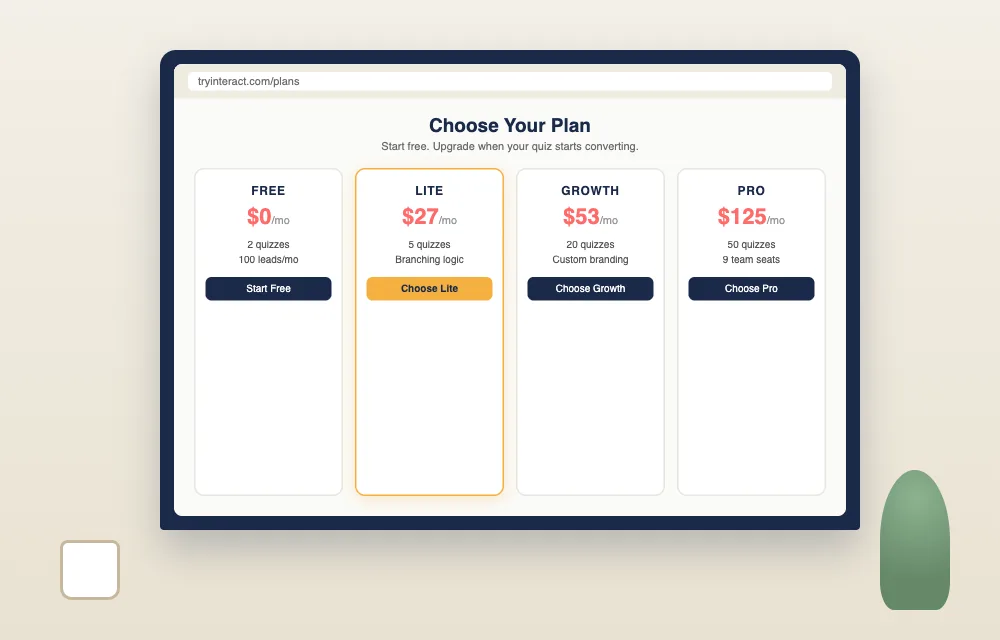
Interact (tryinteract.com) is a quiz-building platform built specifically for lead generation. It combines a drag-and-drop quiz creator, branching result logic, and built-in lead capture in one tool. Plans range from a free tier (2 quizzes, 100 leads a month) to $125 a month for high-volume creators, per Interact’s pricing page.
Most quiz builders fall into one of two camps. General survey tools like Typeform can technically build a quiz, but you configure the branching logic and result pages by hand. Interact was built the other way: personalized outcomes are the default, not a workaround.
The core workflow: pick a quiz template (personality type, product recommendation, or knowledge assessment), write your questions, set which answers route to which result, and connect an opt-in form before the result reveals. The quiz-taker answers a handful of questions, hands over their email to see their result, and lands in your email list automatically.
That last part is the whole pitch. A checklist asks someone to trade their email for a PDF they may never open. A quiz asks them to trade their email for an answer about themselves, something people are far more willing to do. Interact reports its quizzes convert at roughly 40% on average and have generated more than 100 million leads across its user base, though those are Interact’s own marketing figures, not independently audited numbers.
For a creator like Maya, this is the appeal: the technical intimidation of “build a quiz with branching logic” turns into “fill in a template and pick your questions.” The full mechanics of designing the quiz itself, topic selection, question writing, result pages, are covered in the complete quiz lead magnet guide. This review focuses on the tool.
What Features Does Interact Include?
AI-Assisted Quiz Builder and Branching Logic
Interact’s quiz builder uses an AI-assisted editor that drafts a first set of questions and answer options from a topic prompt, which you then edit by hand. Branching logic routes each quiz-taker to a personalized result based on their answers, a feature included starting on Interact’s paid Lite plan, per Interact’s pricing page.
You start by describing your quiz topic. Interact’s AI drafts a set of questions and possible answers, which you then rewrite in your own voice. The draft is a starting point, not a finished product. The actual routing logic, deciding which combination of answers leads to which result, is built visually. No code, no spreadsheet of if-then rules.
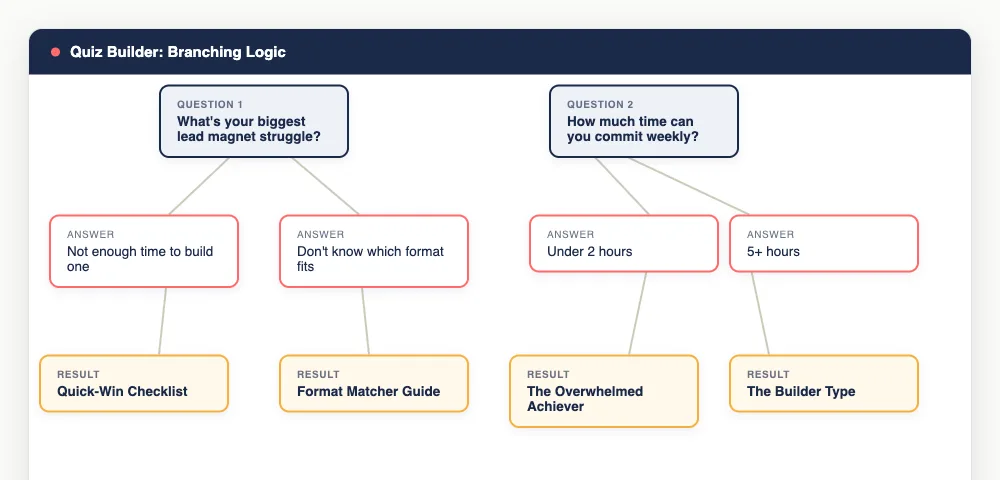
One catch: branching logic sits behind the paid tiers. The free plan lets you build a quiz and capture leads, but the personalized-result mechanic that makes a quiz outperform a PDF in the first place is not included there. If branching logic is the reason you are considering Interact over a generic form tool, budget for the Lite plan from day one.
Templates and Personalized Result Pages
Interact organizes templates by quiz type: personality assessments, product or service recommendations, and knowledge or skill quizzes. Each result page can carry its own headline, description, and recommended next step, which turns the quiz into a segmentation tool, not just a lead magnet.
The templates solve the blank-page problem. Instead of staring at an empty quiz builder, you start from a structure that already matches your quiz type and swap in your own questions and branding.
The result pages matter more than they first appear. A generic “thanks for taking the quiz” page wastes the moment where the reader is most engaged. Interact lets you write a distinct result page per outcome, meaning a coach can send “The Overwhelmed Achiever” result down a different email sequence than “The Burned-Out Perfectionist” result. That segmentation is the real product, not the quiz itself.
Lead Capture and Email Integrations
Interact captures leads through an opt-in form built into the quiz flow, typically placed right before the result reveal. Captured contacts sync to ConvertKit, Mailchimp, and other major email platforms through native integrations, so subscribers land in your existing list and automation without manual exporting.

The opt-in gate sits at the highest-intent moment in the entire funnel: the quiz-taker has already invested two minutes answering questions and wants to see their result. That is a far higher-converting placement than a generic “subscribe to our newsletter” form.
Once someone opts in, Interact hands the contact off to your email platform. If you are on ConvertKit’s free plan, like Maya, the integration adds the subscriber and applies whatever tag or sequence you set up, so your welcome and result-specific follow-up emails start firing without you touching a CSV file.
Funnel Analytics and Drop-Off Tracking
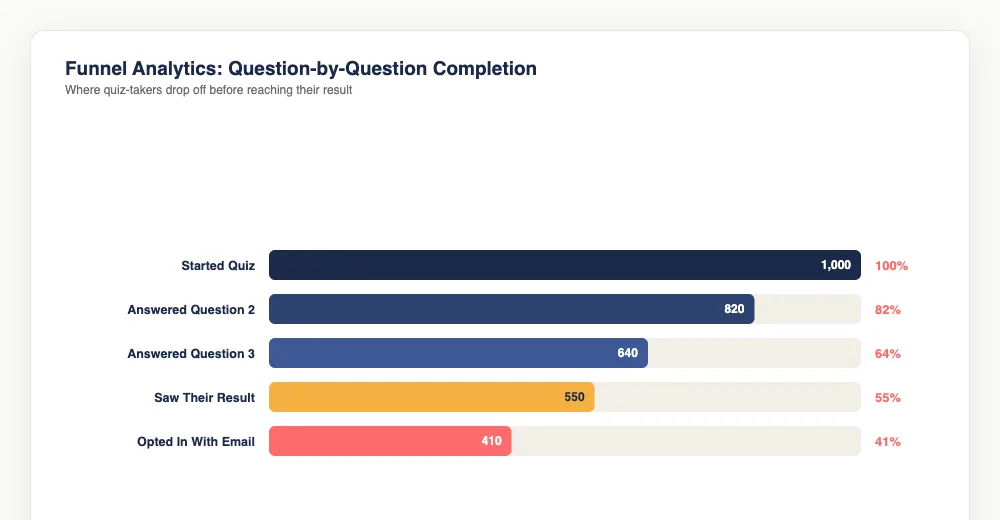
Interact’s funnel analytics show completion rate, question-by-question drop-off, and which quiz results are most common among respondents. Basic analytics are available on every paid plan; Growth and Pro add more detailed conversion tracking, per Interact’s pricing page.
This is where a dedicated quiz tool earns its cost over a generic form. If most people abandon your quiz at question four, that is a specific, fixable problem. Maybe the question is confusing, maybe it feels invasive. A static PDF opt-in form cannot tell you any of that. A quiz with funnel analytics can.
What Are Interact’s Pros and Cons?
What Interact Does Well
- Branching logic is the actual product. Most competitors bolt personalization onto a survey tool. Interact built the routing logic first and the quiz interface around it.
- The free plan is a real test, not a bait-and-switch. Two quizzes and 100 leads a month, no credit card required, is enough to check whether a quiz outperforms your current lead magnet before you spend anything.
- Templates by quiz type remove the blank-page problem. Personality, product-recommendation, and knowledge-assessment templates give you a working structure to edit rather than build from scratch.
- Funnel analytics diagnose drop-off, not just downloads. Question-by-question completion data tells you exactly where the quiz loses people.
- Native integrations with ConvertKit and Mailchimp mean captured leads flow into your existing list without manual work.
Where Interact Falls Short
- Branching logic is not on the free plan. The one feature that makes a quiz worth building over a checklist requires the $27-a-month Lite tier.
- Lead caps get tight fast. Lite’s 500-leads-a-month ceiling is easy to hit if the quiz gets real traffic, and the jump to Growth ($53 a month) nearly doubles the price.
- No document lead magnets. Interact only builds quizzes. If you also want a checklist or ebook format, you need a second tool like Beacon or Canva.
- The AI-drafted questions need real editing. The first-draft questions read generically. Expect to rewrite most of them in your own voice before publishing.
Interact Pricing: What Do the Plans Actually Include?
| Plan | Price (Billed Annually) | Price (Billed Monthly) | Quizzes | Leads/Month | Branching Logic | Team Members |
|---|---|---|---|---|---|---|
| Free | $0 | $0 | 2 | 100 | No | 0 |
| Lite | $27/mo | $39/mo | 5 | 500 | Yes | 1 |
| Growth | $53/mo | $89/mo | 20 | 2,000 | Yes | 4 |
| Pro | $125/mo | $209/mo | 50 | 8,000 | Yes | 9 |
Pricing and plan limits per Interact’s plans page, current as of publish.
For most solo creators, the real decision is between Free and Lite. The free plan is enough to build a quiz, publish it, and see if people actually finish it and opt in, but it will not show the personalized-result mechanic that makes a quiz outperform a static PDF. That requires Lite at minimum.
Growth makes sense once you are running more than one quiz, a different quiz per content cluster, the same logic behind using multiple lead magnet formats across a site, or once 500 leads a month starts to feel tight. Pro is built for agencies and teams managing quizzes for multiple clients, not a solo creator’s first funnel.
Who Should Use Interact?
Use Interact if:
- Your lead magnet is, or should be, a personality, product-recommendation, or knowledge quiz
- You want built-in branching logic without hand-coding result routing
- You are comfortable paying $27-53 a month once you move past the free plan
- You already have ConvertKit, Mailchimp, or a similar platform ready to receive leads
Do not use Interact if:
- Your lead magnet is a document format (checklist, workbook, ebook). Use Beacon or Canva instead.
- You need branching logic on a zero-dollar budget. The free plan does not include it.
- You need more than 500 leads a month without upgrading past Lite.
For Maya, the coach who has heard three different people tell her to try a quiz but has never touched a branching-logic tool, Interact removes the technical barrier. The free plan lets her build the quiz and see if her Instagram followers actually finish it before she commits $27 a month to unlock the feature that makes it work. Test free, then pay once the idea is validated. That is the right order for anyone building their first quiz lead magnet.
Frequently Asked Questions
Is Interact free to use?
Interact has a free plan with 2 quizzes and up to 100 leads a month, no credit card required. It does not include branching logic, so quiz results are not personalized on the free tier. Personalized result pages require the Lite plan at $27 a month billed annually, per Interact’s pricing page.
Does Interact integrate with ConvertKit?
Yes. Interact connects natively to ConvertKit, Mailchimp, and other major email marketing platforms. When someone completes a quiz and opts in, their contact information syncs to your connected platform automatically, so your existing welcome sequence or tags apply without manual work.
How much does Interact cost per month?
Interact’s paid plans run from $27 a month (Lite, billed annually) to $125 a month (Pro, billed annually), with a $0 free plan available. Monthly billing costs more: Lite is $39 a month if paid month-to-month instead of annually, per Interact’s plans page.
What is the difference between Interact and Typeform for quiz lead magnets?
Interact builds branching result logic and personalized outcome pages into the core product. Typeform is a general survey tool; building the same personalized-result mechanic requires manual logic configuration that Interact includes by default. For a quiz lead magnet specifically, Interact needs less setup work.
Keep Reading
What to Do Next
Choose the path that fits where you are right now.
Your Lead Magnet Is Two Hours Away. Pick Your Format First.
One email. One page. Match your audience type to the lead magnet format most likely to convert — so you stop flip-flopping and start building.
Send Me the Decision Matrix