In this article
Nobody sells a button that builds a lead magnet. Plenty of tools claim to. This roundup separates what AI and template generators really do from what the marketing says, so you can pick one in an afternoon and ship a checklist by the weekend.
What Is a Lead Magnet Generator?
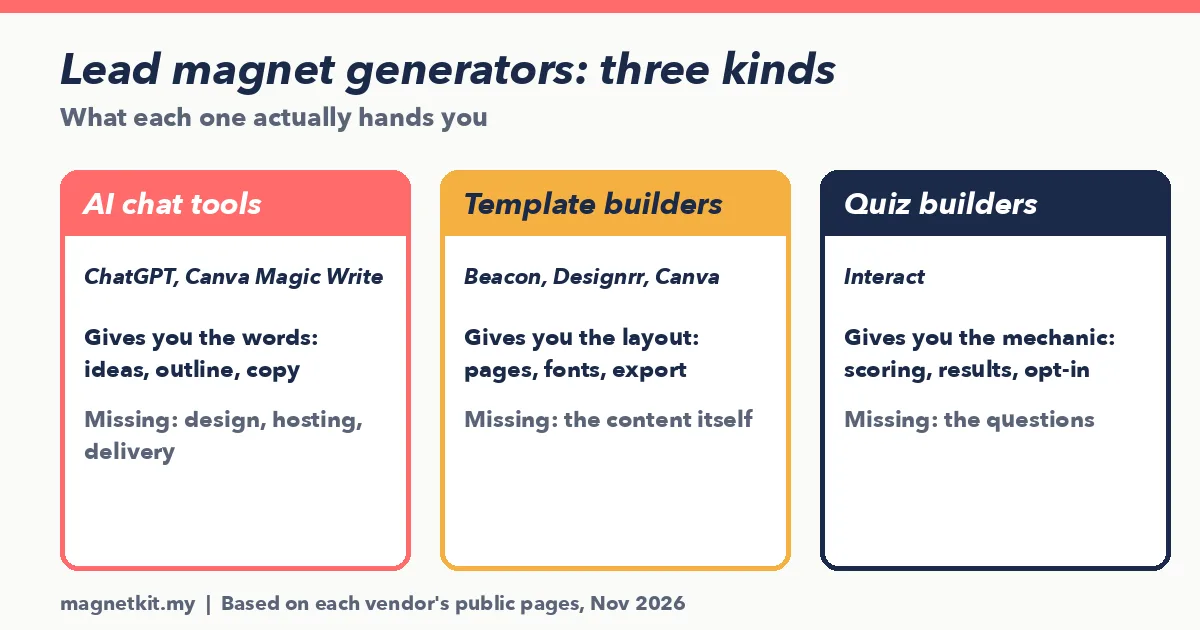
A lead magnet generator is a software tool that produces part of a lead magnet, such as the ideas, the written draft, the page layout or the quiz logic, from a short input. Most pricing pages we read in November 2026 show that no tool covers all four parts, so you will usually combine two.
The phrase covers three very different kinds of tool. People searching for it expect one thing and get another.
An AI chat tool like ChatGPT writes words. Give it your audience and problem and it returns topic ideas, an outline or a draft. It does not lay out a PDF or host a download page.
A template builder like Beacon, Designrr or Canva gives you the layout. You bring the content. Some of them now bundle an AI writer, which blurs the line.
A quiz builder like Interact supplies the mechanic: questions, scoring and an email gate before the result.
Here is how they compare on the facts each vendor publishes.
| Tool | Kind | Generates | Free plan | Paid from |
|---|---|---|---|---|
| ChatGPT | AI chat | Ideas, outlines, copy | Yes, with limits on uploads and images (OpenAI pricing page) | See OpenAI’s plans |
| Canva | Template plus AI | Layout, Magic Write text | Yes, 1.6M+ templates (Canva pricing page) | US$144 per year for Pro |
| Beacon | Template builder | PDF layout, hosted delivery | Yes, 1 lead magnet per month (Beacon pricing page) | $19 per month (Lite) |
| Designrr | Template plus AI | Ebook layout, Wordgenie AI text | No free plan listed | $29 per month (Standard) |
| Interact | Quiz builder | Quiz and opt-in flow | “Free forever” per its homepage | See Interact’s pricing page |
Prices change often, so check each page before you pay. We read all five in November 2026 and did not run paid tests of every plan, which means the verdicts below rest on documented features, not on a stopwatch.
Can ChatGPT Generate a Lead Magnet for You?
ChatGPT can generate the raw material for a lead magnet, including topic ideas, an outline and a first draft, in minutes. OpenAI’s pricing page lists unlimited text chats on its free plan, with limited image creation and uploads. It cannot design, host or deliver the finished file.
This is the most common answer to the keyword, and it is half right. A chat tool kills the blank page. It does not give you a lead magnet.
The best use is narrow. Paste in who the reader is and the one problem you solve, then ask for ten checklist ideas ranked by how fast each can be finished. Pick one. Ask for an outline. Write the final text yourself, using the draft as scaffolding.
Our step-by-step ChatGPT lead magnet workflow has the prompts, section by section.
The honest weakness: generic output. An unedited draft reads like every other freebie in your niche, and subscribers notice. Add one real example, one number from your own work and one opinion the model would never volunteer.
Best for: getting unstuck on topic and outline. Skip it if: you want a designed PDF out the other end.
Do Template Builders Like Beacon and Designrr Count as Generators?
Yes, in the sense that matters: they turn content into a finished, branded document fast. Beacon’s free plan allows 1 lead magnet per month and Lite is $19 per month, according to Beacon’s pricing page. Designrr starts at $29 per month and bundles a Wordgenie AI writer.
Template builders solve the part chat tools cannot: layout. Pick a template, drop in text, export.
Beacon: layout plus hosted delivery
Beacon only does lead magnets. It builds the document, hosts the download page and captures the email in one flow. Our Beacon lead magnet builder review covers it in full.
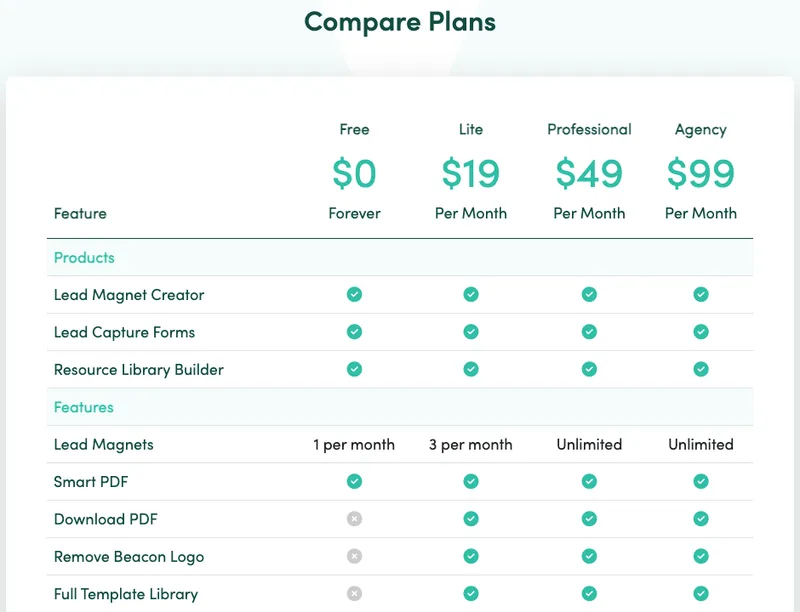
Read that table before you commit. On the free plan, per Beacon’s own page, you get 1 lead magnet per month and the Smart PDF (a web version), but not Download PDF, Beacon-logo removal or the full template library. Lite at $19 per month raises the cap to 3 per month and unlocks those. Beacon also lists $190 per year for Lite, which it describes as two free months.
For a first checklist the free plan works. For a regular publishing habit, you will hit the cap.
Designrr: AI text for existing content
Designrr’s pitch is repurposing. Its pricing page says you can import from the web, MS Word and Google Docs, and the Standard plan at $29 per month includes the Wordgenie AI content creator. Premium at $49 per month adds an AI image generator.
That fits a blogger with 50 old posts. It fits less well a creator starting from zero, since the AI helps you reword, not decide what to say. See our Designrr review for the plan-by-plan view.
Best for: multi-page guides, workbooks and ebooks. Skip it if: your magnet is a one-page checklist.
Is Canva’s Free Template Library the Cheapest Generator?
For one-page checklists and cheat sheets, Canva is the cheapest route. Its pricing page lists 1.6M+ templates on the free plan and US$144 per year for Pro. The free plan includes limited access to Canva’s AI features, enough to draft a few lines of copy.
Canva is not a lead magnet tool. It is a design tool with a lead magnet shelf. That is also why it wins for simple formats: you control every pixel, and the free plan costs nothing.
What it will not do: host the file, capture an email or deliver anything. You pair it with an email platform you already use.
Canva’s Magic Write drafts text inside a document, so a checklist can go from blank page to outline without leaving the tab. Treat that text as a draft. Rewrite every line in your voice.
The Canva lead magnet walkthrough shows the full build, and Beacon vs Canva settles which to pick when both seem to fit.
Best for: checklists, cheat sheets, one-page templates. Skip it if: you want hosting and email capture in the same tool.
Not sure which format to build before you open any tool? Grab the free Lead Magnet Decision Matrix on the start page. It matches your audience to a format. One page. Free. No pitch.
Is a Quiz Builder Like Interact a Lead Magnet Generator?
A quiz builder generates the interactive part of a lead magnet: questions, scoring and an email gate before the result. Interact’s homepage advertises a free forever plan with no credit card, and its example quiz asks for an email before showing a result.
Quizzes are the one format a PDF tool cannot copy. The reader gets a personal answer, and you get an email address that comes with context about what they chose.
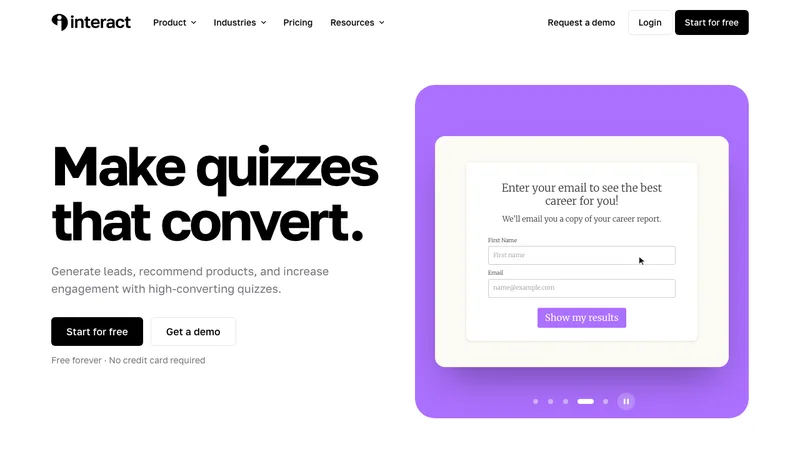
The screenshot shows the mechanic. The quiz asks for a name and email, then reveals the result. That gate is where the lead is captured.
Interact’s navigation also lists free AI tools for quizzes. We did not test them, so we cannot tell you how good the generated questions are. Expect to rewrite them.
The catch is effort. A quiz needs questions, result profiles and logic, and the writing is still yours. Our Interact quiz builder review covers setup.
Best for: coaches and consultants who segment readers. Skip it if: you need something live this weekend and have never built a quiz.
What Are the Pros and Cons of Using a Generator?
Generators save the most time on the first draft and the layout. According to the vendor pages we read, none of them choose your topic, prove your claims or promote the page. The time you save lands on the easy steps, and the hard ones stay yours.
Pros
- They remove the blank page. A topic, outline or layout appears in minutes.
- Costs are low. ChatGPT, Canva, Beacon and Interact all list a free tier.
- Templates make a document look finished without design skills.
- Hosting tools like Beacon capture the email in the same step, which saves wiring up a form.
Cons
- Output is generic until you add specifics only you have. Subscribers can tell.
- Free plans have caps: Beacon’s is 1 lead magnet per month and no Download PDF, and ChatGPT’s free image and upload limits apply.
- No generator picks the right offer. A polished checklist on the wrong topic still earns nothing.
- Stacking tools adds subscriptions. Designrr alone starts at $29 per month.
We keep one rule on MagnetKit: a checklist built in a weekend beats an ebook you never ship. Generators help you hit that weekend. They do not replace the decision about what to build.
Which Lead Magnet Generator Should You Choose?
Choose by format, not by hype. Start with a chat tool for ideas, then Canva for a one-page checklist, Beacon or Designrr for a multi-page guide, and Interact for a quiz. Most solo creators need two of the four, and one of them is usually free.
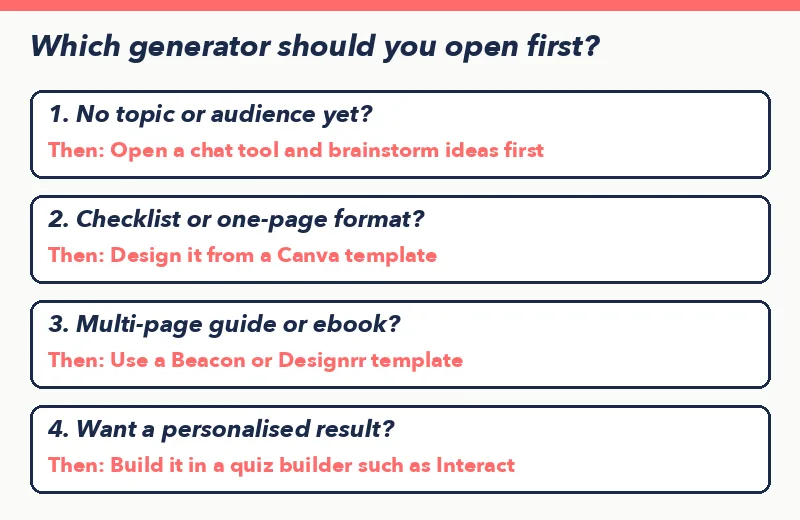
Here is who each tool fits.
- You have no topic yet. Open ChatGPT, give it your audience and problem, and shortlist three ideas. Then move on within an hour.
- You want a checklist or cheat sheet. Use Canva’s free templates and an email tool you already have. Cost: nothing.
- You want a multi-page guide with built-in delivery. Use Beacon. Move to Lite at $19 per month once the free cap bites.
- You have a pile of old posts. Use Designrr to repurpose them, and budget at least $29 per month.
- You coach or consult and want to segment. Use Interact and write the questions yourself.
Not sure what to build? The best lead magnet tools guide sorts every tool by job, and the free lead magnet tools list shows how far a zero budget goes.
One last check before you publish. Read the whole thing aloud. If a line could sit in any other creator’s freebie, rewrite it.
Frequently Asked Questions
What is the best free lead magnet generator?
There is no single best one. ChatGPT’s free plan covers ideas and drafts, Canva’s free plan includes 1.6M+ templates for layout, and Beacon’s free plan allows 1 lead magnet per month with hosting. Combine a free chat tool with a free template tool and you have a complete workflow at no cost.
Can AI create a lead magnet from scratch?
AI can draft the text of a lead magnet from scratch, but it cannot finish one alone. It will not design the PDF, host the download or capture the email unless you pair it with a builder. Plan on editing every AI draft, since unedited output sounds generic and weakens trust with new subscribers.
Is a lead magnet generator worth paying for?
Usually not at the start. Free plans from Canva, Beacon and Interact cover a first lead magnet. Pay only when a cap blocks you, such as Beacon’s 1 lead magnet per month on the free plan, where Lite costs $19 per month. Upgrade after your first magnet proves people will opt in.
How long does it take to make a lead magnet with a generator?
A one-page checklist typically takes a few hours when you use a chat tool for the outline and a template for the layout. Quizzes and multi-page guides take longer because the writing is still yours. These are planning estimates, not vendor figures, so treat the first one you build as your own benchmark.
Keep Reading
What to Do Next
Choose the path that fits where you are right now.
Pick Your Lead Magnet Format Before You Build.
Get the free three-page Decision Matrix PDF. Match your audience to a lead magnet format, with a format quick reference to help you start building.
Get the Decision Matrix